ipyfilechooser
ipyfilechooser is a small, single-purpose ipywidget by Thomas Bouve (crahan): a file/directory browser built entirely out of core ipywidgets controls (a path dropdown, a listing, a text field, and a button). It has no custom JavaScript, no canvas, nothing to compile – it’s about as simple as a widget gets, and that simplicity is exactly why it’s useful in Shiny: it’s a stable, dependency-light way to let an app read from the server’s own filesystem.
That’s the important distinction to get right up front. Shiny already has a file input, ui.input_file() – but it uploads a file from the visitor’s machine to the server. @render_ipyfilechooser does the opposite: it browses files that are already on the server, which only makes sense when the server’s filesystem is something your users (or you, as the developer) should be looking at – a desktop-style internal tool, a data lake mounted next to the app, a directory of model checkpoints, a sandboxed scratch space. Never point an unsandboxed chooser at a multi-tenant server’s filesystem; see “Framing: whose files are these?” below.
The decorated function returns an ipyfilechooser.FileChooser and shinywidgets takes care of the rest: giving it its own session-scoped layout (working around an import-time quirk in the library – see Gotchas), sizing it as an unfilled, natural-size control, and round-tripping a confirmed selection back to Python. This widget has no reactive accessors (see below for why, and the pattern that replaces them); the rest of this guide is about using it well regardless.
Installation
pip install 'shinywidgets[ipyfilechooser]'Quick start
A chooser rooted at a directory, with the confirmed selection read back into a reactive.value. selected is a plain Python property on FileChooser, not a widget trait, so getting the value back into Shiny means register_callback() – not reactive_read() or .read() (more on this below).
import os
import tempfile

from ipyfilechooser import FileChooser
from shiny import reactive, render
from shiny.express import ui
from shinywidgets import render_ipyfilechooser

def make_sample_dir() -> str:
    """A couple of sample files to browse (created fresh each run)."""
    data_dir = tempfile.mkdtemp(prefix="shinywidgets-quickstart-")
    for name in ("notes.txt", "report.csv"):
        with open(os.path.join(data_dir, name), "w") as f:
            f.write(f"sample contents of {name}\n")
    return data_dir


DATA_DIR = make_sample_dir()

ui.page_opts(title="ipyfilechooser quickstart")

selected_path = reactive.value(None)

with ui.card():

    @render_ipyfilechooser
    def chooser():
        fc = FileChooser(path=DATA_DIR)
        # `selected` is a plain property, not a trait: a callback -- not
        # reactive_read() -- is how a confirmed pick reaches Python
        fc.register_callback(lambda fc: selected_path.set(fc.selected))
        return fc

    @render.text
    def selected():
        return f"Selected: {selected_path()}"
Collapsed, before any interaction:

After opening the dialog, picking report.csv, and confirming:

Notice the chooser renders at its natural width (ipyfilechooser’s own 500px default) and doesn’t stretch to fill the card – see “Layout and sizing”.
Framing: whose files are these?
Before reaching for this widget, be clear about which filesystem you’re exposing:
ui.input_file() |
@render_ipyfilechooser |
|
|---|---|---|
| Browses | the visitor’s device | the Shiny server’s filesystem |
| Data moves | browser -> server (upload) | nowhere – selection is just a path |
| Good fit | public apps, user-supplied data | desktop-style internal tools, a single-tenant app, a data directory you control |
| Risk if unsandboxed | none beyond upload size | lets a user read/discover arbitrary server-readable files |
If your app is multi-tenant or public-facing, don’t point a chooser at an unrestricted path. Use sandbox_path to wall the user into a directory (a per-user scratch folder, a shared read-only data drop), and pair it with filter_pattern to keep them on relevant files. The next section verifies that the sandbox actually holds up against the obvious attempt to escape it.
Does sandbox_path actually hold?
Yes, for the normal UI-driven paths: the path dropdown and the file/directory listing are built from the filesystem under sandbox_path and never offer an entry outside it, and navigating a listed subdirectory can’t leave the sandbox because it’s real subdirectories, all below sandbox_path.
The one place a user could try to escape is the filename text field, by typing something like ../secret.txt. We checked this directly: ipyfilechooser validates the filename on every keystroke (is_valid_filename() rejects any .. or path separator), and disables the Select/Change button while the field is invalid – in a real browser, a disabled button simply doesn’t dispatch the click, so the attempt never reaches Python. Verified with Playwright against a sandbox_path that has a real file one level up:
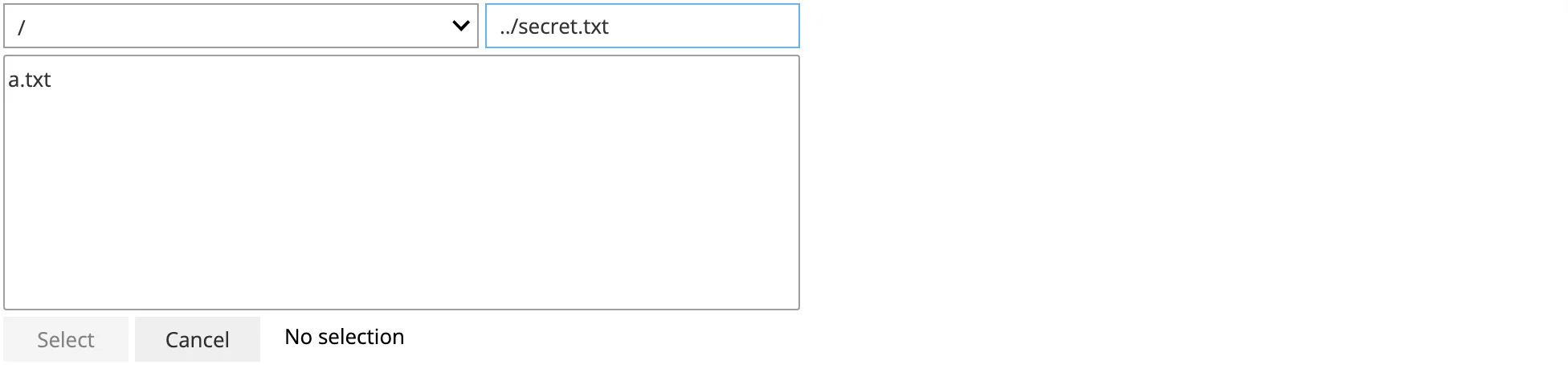
Typing ../secret.txt leaves the Select button disabled (grayed out); Playwright’s own .click() times out with “element is not enabled”. Calling FileChooser methods directly in Python (bypassing the browser) can still construct an out-of-sandbox selected path – the enforcement lives in the button’s disabled state, not in _apply_selection() itself – but that’s not a path a Shiny user can reach through the rendered UI.
Also sandbox-relevant: show_only_dirs=True (pair with a directory-listing app, below) and hiding dotfiles by default (show_hidden=False, the default) keep a sandboxed browser from casually surfacing .env-style files.
What you can build
Pick a data file, then preview it as a table and a plot
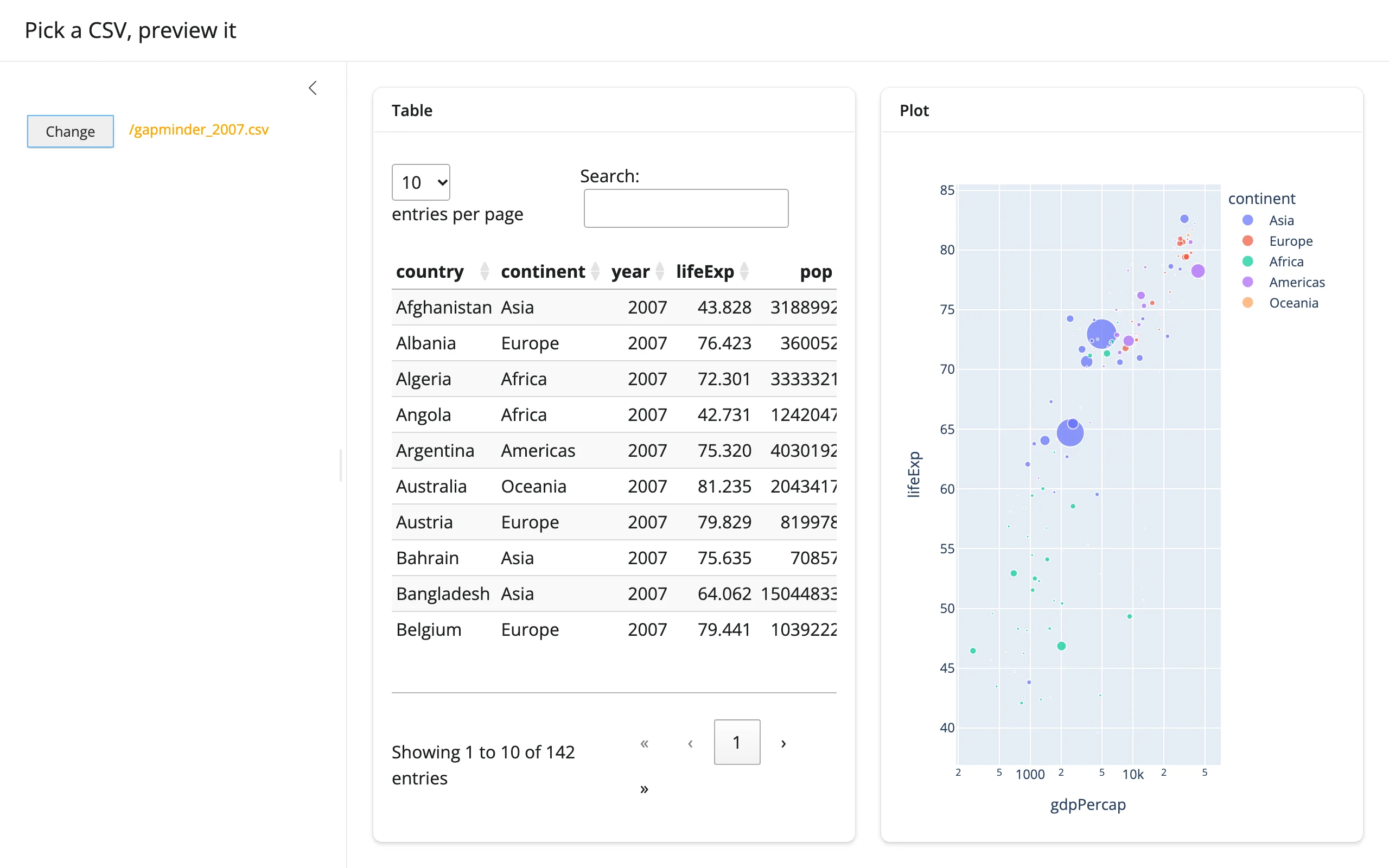
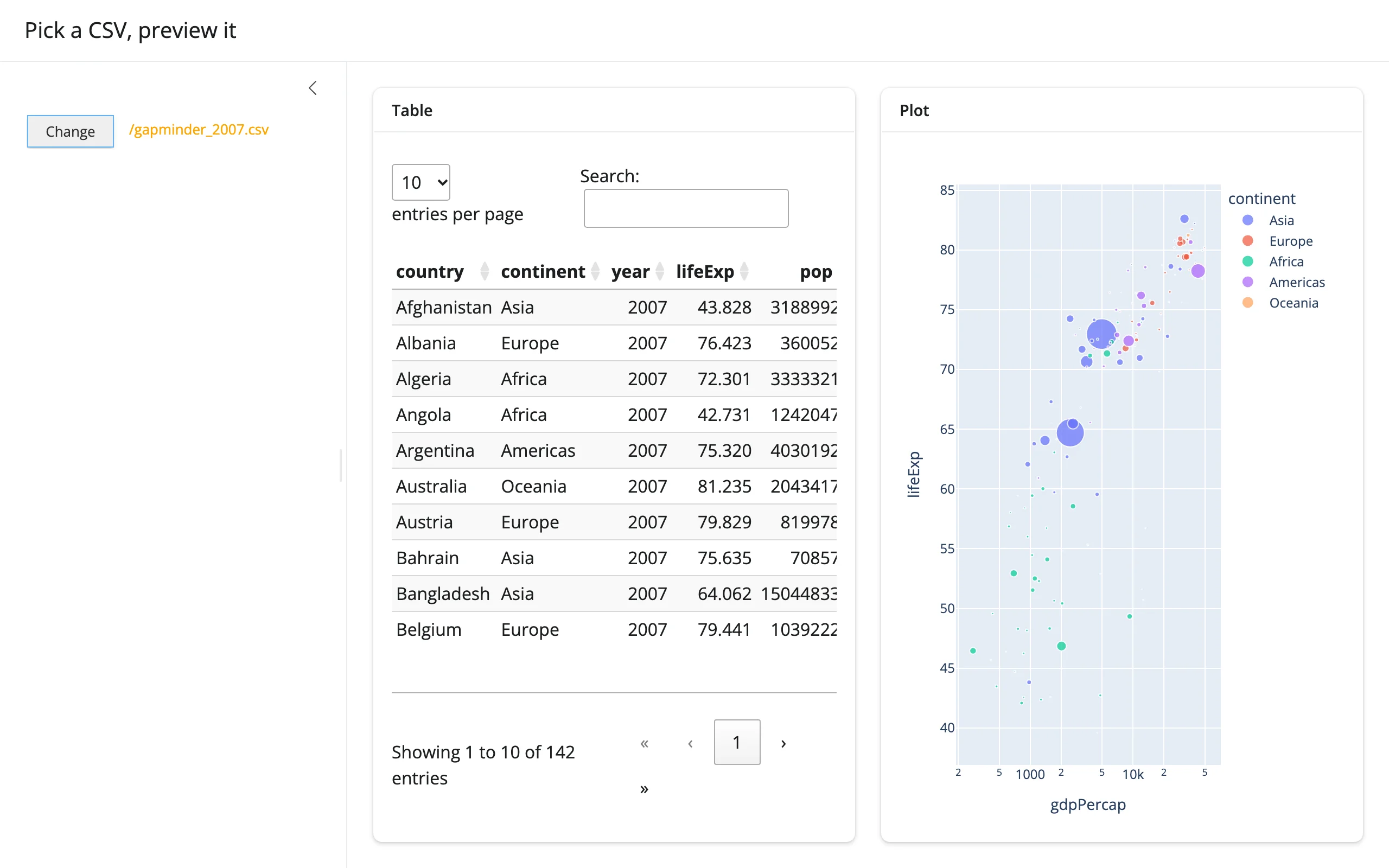
Sandbox the chooser to a data directory, filter to *.csv, and read the confirmed path with pandas – feeding both an itables table and a plotly figure from the same file.
import os
import tempfile

import pandas as pd
import plotly.express as px
from ipyfilechooser import FileChooser
from shiny import reactive, render, req
from shiny.express import ui
from shinywidgets import render_ipyfilechooser, render_itables, render_plotly


def make_data_dir() -> str:
    """A small sandboxed data directory: two CSVs plus a decoy text file."""
    data_dir = tempfile.mkdtemp(prefix="shinywidgets-preview-")
    gapminder = px.data.gapminder()
    gapminder[gapminder["year"] == 2007].to_csv(
        os.path.join(data_dir, "gapminder_2007.csv"), index=False
    )
    px.data.tips().to_csv(os.path.join(data_dir, "tips.csv"), index=False)
    with open(os.path.join(data_dir, "README.txt"), "w") as f:
        f.write("Only *.csv files are selectable here (see filter_pattern).\n")
    return data_dir


DATA_DIR = make_data_dir()

ui.page_opts(title="Pick a CSV, preview it", fillable=True)

picked_path = reactive.value(None)

with ui.sidebar(width=320):

    @render_ipyfilechooser
    def picker():
        fc = FileChooser(path=DATA_DIR, sandbox_path=DATA_DIR, filter_pattern=["*.csv"])
        fc.register_callback(lambda fc: picked_path.set(fc.selected))
        return fc


@reactive.calc
def df():
    req(picked_path())
    return pd.read_csv(picked_path())


with ui.layout_columns(col_widths=(6, 6)):
    with ui.card(full_screen=True):
        ui.card_header("Table")

        @render_itables
        def table():
            return df()

    with ui.card(full_screen=True):
        ui.card_header("Plot")

        @render_plotly
        def plot():
            data = df()
            if "lifeExp" in data.columns:
                return px.scatter(
                    data, x="gdpPercap", y="lifeExp", size="pop", color="continent",
                    log_x=True, hover_name="country",
                )
            return px.histogram(data, x="total_bill", color="sex")
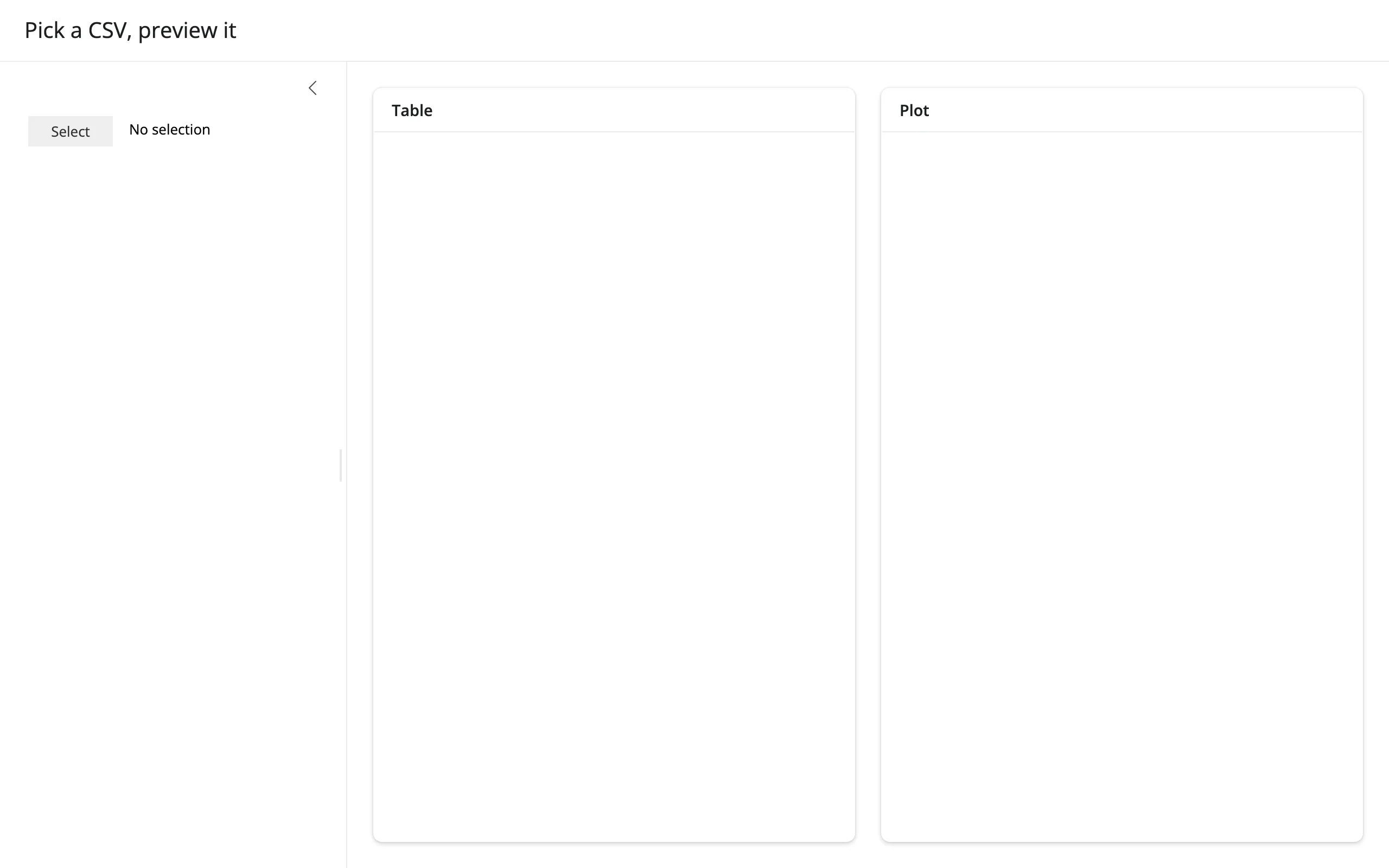
filter_pattern=["*.csv"] keeps README.txt out of the listing entirely – verified: opening the dialog shows only gapminder_2007.csv and tips.csv. Before any pick, both panels are empty (an req()-gated calc with no value yet is a normal state, not an error):
After picking gapminder_2007.csv:
Pick a directory, list its contents
Set show_only_dirs=True and the listing shows only subdirectories; a single click on a row navigates into it (there’s no separate “open” gesture), and confirming with Select/Change applies the current directory as selected_path.
import os
import tempfile

import pandas as pd
from ipyfilechooser import FileChooser
from shiny import reactive, render, req
from shiny.express import ui
from shinywidgets import render_ipyfilechooser


def make_project_dir() -> str:
    """A small project tree: a few subdirectories, each with a few files."""
    root = tempfile.mkdtemp(prefix="shinywidgets-project-")
    for sub, files in {
        "data": ["gapminder.csv", "tips.csv"],
        "notebooks": ["exploration.ipynb"],
        "src": ["app.py", "utils.py", "__init__.py"],
    }.items():
        os.makedirs(os.path.join(root, sub))
        for name in files:
            with open(os.path.join(root, sub, name), "w") as f:
                f.write(name * 20)  # a little bulk so sizes aren't all 0
    return root


PROJECT_DIR = make_project_dir()

ui.page_opts(title="Pick a directory, list its contents")

picked_dir = reactive.value(PROJECT_DIR)

with ui.card():

    @render_ipyfilechooser
    def dirpicker():
        fc = FileChooser(
            path=PROJECT_DIR,
            sandbox_path=PROJECT_DIR,
            show_only_dirs=True,
            title="Pick a subdirectory",
        )
        fc.register_callback(lambda fc: picked_dir.set(fc.selected_path))
        return fc

    @render.data_frame
    def contents():
        req(picked_dir())
        entries = []
        with os.scandir(picked_dir()) as it:
            for entry in it:
                entries.append(
                    {
                        "name": entry.name,
                        "kind": "dir" if entry.is_dir() else "file",
                        "size": entry.stat().st_size,
                    }
                )
        return pd.DataFrame(entries).sort_values(["kind", "name"])
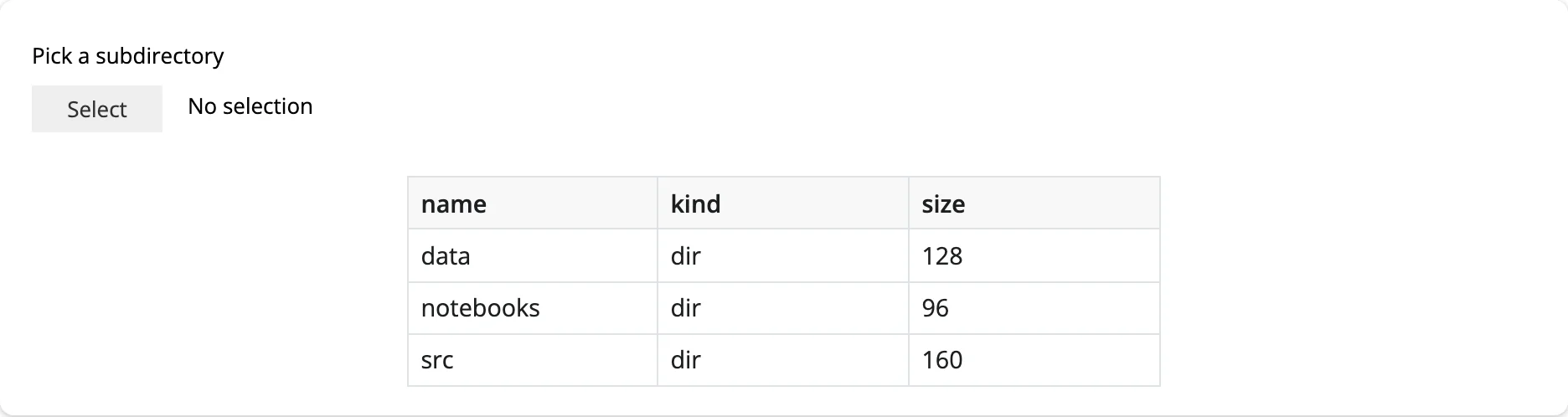
Initial state (the reactive value is seeded with the project root, so the listing shows immediately):
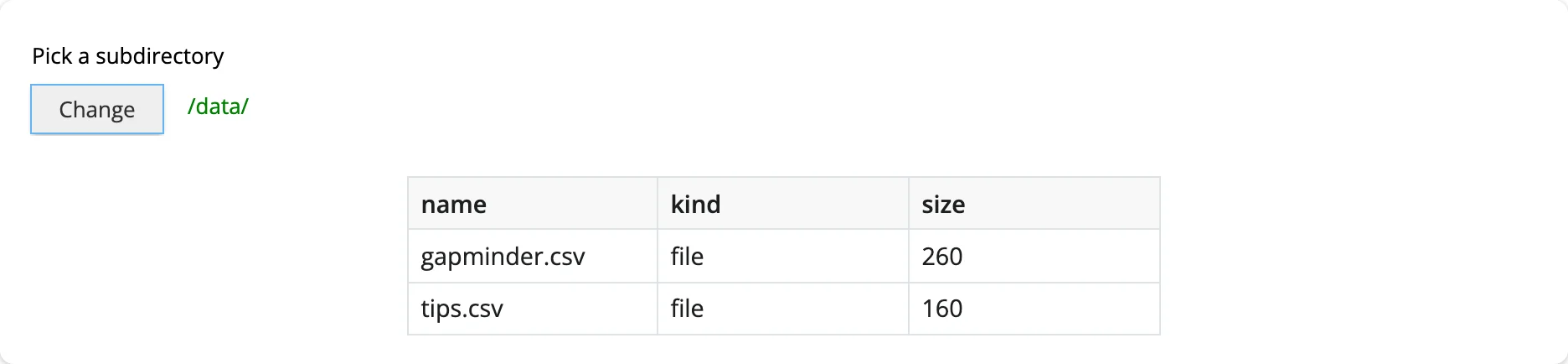
After navigating into data/ and confirming:
Reacting to user interaction
This renderer has no reactive accessors. Every other @render_* in this roster that exposes user interaction does it with accessor methods (fig.selected(), tbl.selected_rows(), …), but FileChooser’s selection state (selected, selected_path, selected_filename) is implemented as plain Python @property getters over private fields – not widget traits. That means three things don’t work here, on purpose:
reactive_read(chooser.widget, "selected")– there’s noselectedtrait to read; this will never fire.chooser.read("selected")–.read()(see the Reacting to widgets article) falls through to the same bare-trait check asreactive_read()when there’s no accessor by that name, so it fails the same way: verified directly, it raisesAttributeError: render_ipyfilechooser has no accessor or synced trait named 'selected'both before and after a real pick, never a stale orNonevalue.- An accessor method like
chooser.selected()– there isn’t one, and there can’t be a reactively-correct one, since nothing invalidates when the property’s backing fields change.
The pattern that replaces them: register_callback()
ipyfilechooser’s own mechanism for “tell me when the user picks something” is FileChooser.register_callback(fn): fn is called with the chooser instance whenever the user confirms a selection (clicks Select/Change while the dialog is open and the button is enabled). The idiomatic Shiny bridge is to have that callback set a reactive.value:
selection = reactive.value(None)

@render_ipyfilechooser
def chooser():
    fc = FileChooser(path="/data", filter_pattern=["*.csv"])
    fc.register_callback(lambda fc: selection.set(fc.selected))
    return fc
What to know about this, all verified against current main:
- Fires on confirm, not on every keystroke or navigation. Browsing the listing or editing the filename field doesn’t call the callback; only the button click that applies a selection does.
- One callback per chooser.
register_callback()overwrites_callback; if you need to do more than one thing, compose it inside the lambda/function you register. Nonebefore any pick is the normal starting state for your mirroredreactive.value– seed it withNone(or a real default, see below) and gate downstream reads withreq().- A re-render gives the user a brand new
FileChooserwith no selection, same as every other widget in this roster: re-running the decorated function throws away the old chooser (collapsed state, callback and all) and mounts a fresh one. select_default=Truedoes not fire the callback. Constructing a chooser withfilename="app.py", select_default=Trueshowsapp.pyas selected in the UI, but the callback only runs on a user-confirmed pick – a programmatic default never triggers it. Seed yourreactive.valuewith that same default yourself (the gallery showcase below does this)..reset(path=...)doesn’t fire the callback either, but does silently reapplyselect_default. If you built the chooser withselect_default=Trueand later call.reset(path=...)from Python (e.g., a “jump to” button), ipyfilechooser re-selects the default filename in the new path internally – updatingfc.selected– without invoking your callback. If you mirrorfc.selectedelsewhere, re-read it manually right after callingreset(); see “Updating the widget from Python” for the exact pattern and the startup-ordering trap it avoids.
Beyond the callback: reading plain attributes
There’s no reactive_read()-worthy trait on this widget, but a few non-reactive attributes are worth reading inside the same callback or right after, since they describe the chooser’s current browsing state (not just the final selection): fc.show_hidden, fc.filter_pattern, and fc.sandbox_path just return the values you set – there’s nothing to “discover” by reading them that you don’t already know from your own inputs.
Updating the widget from Python
Three FileChooser properties are real setters that refresh the rendered chooser in place – no re-render, no lost in-flight navigation:
chooser.widget.show_hidden = True/Falsechooser.widget.filter_pattern = [...](orNoneto clear it)chooser.widget.reset(path=..., filename=...)– jump to a new starting location (and optionally seed a filename); clears any current selection, and closes the dialog if it was open.
import os
import tempfile

from ipyfilechooser import FileChooser
from shiny import reactive, render
from shiny.express import input, ui
from shinywidgets import render_ipyfilechooser


def make_project_dir() -> str:
    root = tempfile.mkdtemp(prefix="shinywidgets-controlled-")
    os.makedirs(os.path.join(root, "data"))
    os.makedirs(os.path.join(root, "src"))
    for name in ("data/gapminder.csv", "data/tips.csv", "src/app.py", "notes.md"):
        with open(os.path.join(root, name), "w") as f:
            f.write("sample\n")
    with open(os.path.join(root, ".env"), "w") as f:
        f.write("SECRET=shh\n")
    return root


ROOT = make_project_dir()
BOOKMARKS = {"root": ROOT, "data": os.path.join(ROOT, "data"), "src": os.path.join(ROOT, "src")}

ui.page_opts(title="Steering the chooser from Shiny inputs")

with ui.sidebar():
    ui.input_select("jump", "Jump to", choices=list(BOOKMARKS))
    ui.input_checkbox("hidden", "Show hidden files", False)
    ui.input_select(
        "filter", "Filter", choices={"none": "all files", "csv": "*.csv", "py": "*.py"}
    )

selected_path = reactive.value(None)

with ui.card():

    @render_ipyfilechooser
    def chooser():
        fc = FileChooser(path=ROOT, sandbox_path=ROOT)
        fc.register_callback(lambda fc: selected_path.set(fc.selected))
        return fc

    @render.text
    def selected():
        return f"Selected: {selected_path()}"


# Python -> browser: jump the chooser to a bookmarked folder. reset() clears
# any current selection, so clear the mirrored reactive.value too
@reactive.effect
def _jump():
    chooser.widget.reset(path=BOOKMARKS[input.jump()])
    selected_path.set(None)


# These setters refresh the chooser's listing in place -- no re-render, and
# the user's current path and any confirmed selection are left untouched
@reactive.effect
def _toggle_hidden():
    chooser.widget.show_hidden = input.hidden()


@reactive.effect
def _set_filter():
    f = input.filter()
    chooser.widget.filter_pattern = None if f == "none" else [f"*.{f}"]
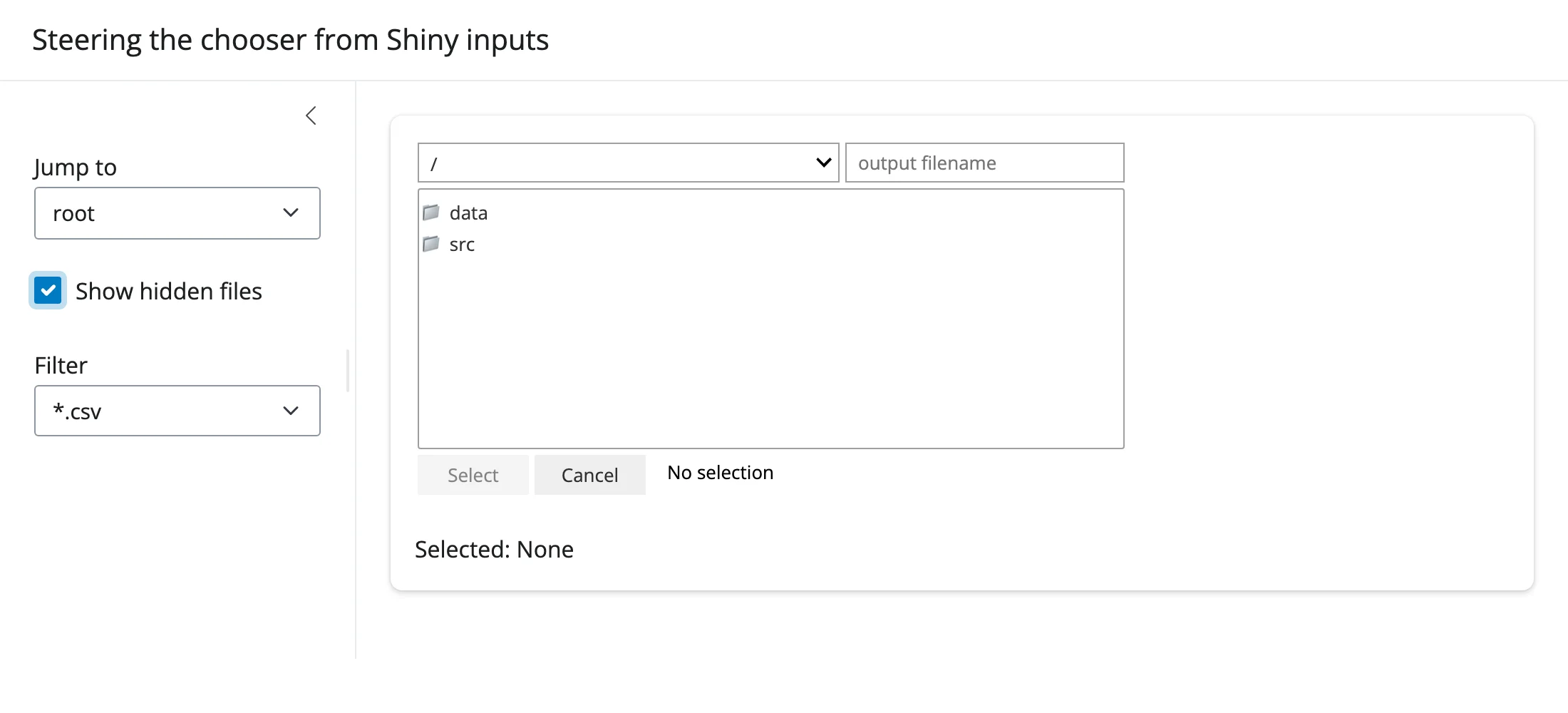
With the dialog open, hidden files on, and the filter set to *.csv (so only data/ and src/ show – no .env, no notes.md):
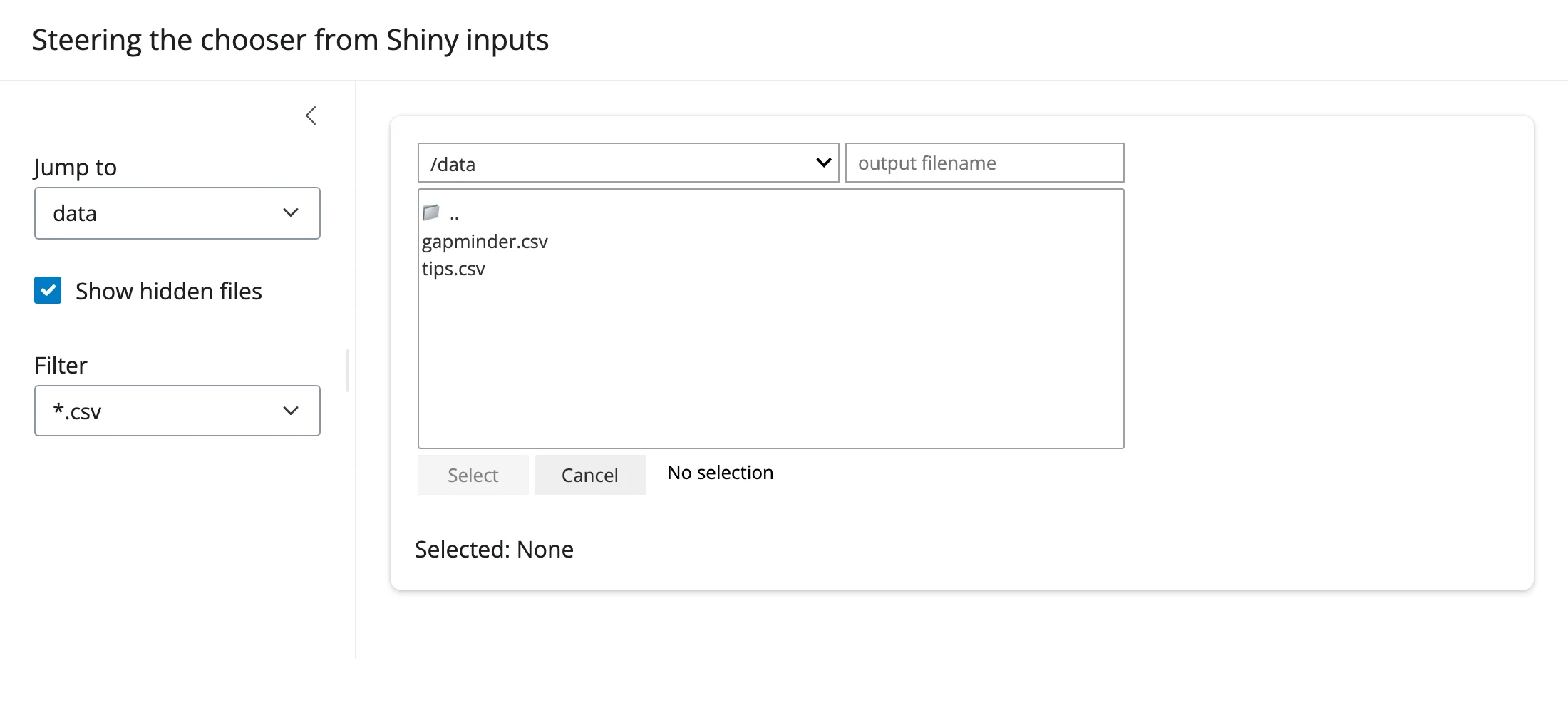
After choosing “data” from “Jump to” (which also closes the dialog – reopened here to show the result): the listing is now data/’s contents, still filtered to *.csv:
Why effects instead of re-rendering: re-running the decorated function would tear down and rebuild the whole chooser (and any other in-flight dialog state) every time a sidebar input changes. Driving .widget’s own setters from a @reactive.effect is the “move the existing control” equivalent of what reactive.isolate() + .widget does for plot-like widgets – except here there’s no camera/zoom state to preserve, just the user’s current place in the directory tree, which setting show_hidden/filter_pattern leaves untouched (confirmed: navigating into a subfolder, then toggling a filter, keeps you in that subfolder).
A startup-ordering trap, if you combine select_default=True with a Python-driven reset(): a @reactive.effect that calls .reset(path=...) in response to an input runs once at startup too (Shiny effects always run their first pass immediately), which would immediately call reset() on the just-constructed chooser and silently reapply select_default’s pick – clobbering whatever you seeded your mirrored reactive.value with, before the user ever touches the input. Gate the effect with @reactive.event(input.jump, ignore_init=True) so it only fires on an actual change. The gallery showcase below needs exactly this fix.
Coordinating multiple views
Pick a CSV, drive a table and a plot. This is “What you can build” -> “Pick a data file” above: one reactive.calc reads the file once, two renderers (render_itables, render_plotly) each consume it. Because both read the same calc, they always show the same file and recompute together.
Pick a directory, drive a listing. “What you can build” -> “Pick a directory” above: the confirmed selected_path feeds a render.data_frame built from os.scandir(). The same shape works for a file count, a total size, a thumbnail grid, or a second chooser scoped to the one just picked (nested browsing).
Bookmarks + filters steering one chooser, one downstream view. “Updating the widget from Python” above: sidebar inputs change what the chooser shows (not a separate output), which is its own small linked-view pattern – Shiny inputs on one side, an ipywidget on the other, connected by plain attribute assignment instead of a second render pass.
For a combination of all three – bookmarks, filters, hidden-files, and a preview that adapts to what’s picked (CSV vs. text) – see the showcase_file_inspector.py gallery app below.
Layout and sizing
FileChooser is composed entirely of @jupyter-widgets/controls widgets (a VBox of a Dropdown, a Select, a Text, and Buttons), so shinywidgets’ general “input-like widget” rule applies: the output renders at its natural size and does not stretch to fill a fillable container, the same as a slider or checkbox would. This was confirmed both by reading set_layout_defaults() and by measuring the rendered element: a default chooser keeps ipyfilechooser’s own 500px width in a 600px-tall card, rather than growing to fill it.
- To change the width, set it on the chooser itself:
FileChooser(layout=Layout(width="700px")). A user-suppliedlayoutalways wins over the default. - Don’t try to set a height – there’s nothing to fill; the dialog’s own listing already scrolls (
rows=controls how many rows show before it does). output_widget("id", width=...)also works if you’d rather size the output container than the widget itself, but sizing theFileChooser’s ownlayoutis simpler and is what every example in this guide does.
Gotchas and limitations
Verified on current main:
selected/selected_path/selected_filenameare properties, not traits. This is the single most important thing to internalize about this widget – see “Reacting to user interaction” above. It’s an upstream design choice, not a shinywidgets limitation.select_default=Trueand.reset(path=...)don’t fireregister_callback()’s callback. Both apply a selection programmatically; the callback is reserved for user-confirmed picks. Seed/re-read your mirroredreactive.valuemanually in both cases (see “Reacting to user interaction” and the startup-ordering trap in “Updating the widget from Python”)..reset(path=...)closes the dialog if it was open. Driving the chooser to a new location from Python collapses any in-progress browsing back to the collapsed “Select”/“Change” button state. Verified with Playwright: the file listing is hidden immediately after a Python-triggeredreset().- Directory navigation is a single click on the row; Select/Change only opens or confirms. Clicking a folder row navigates into it immediately; there’s no separate “enter” gesture. This matches ipyfilechooser’s own Jupyter behavior exactly and isn’t shinywidgets-specific, but it means “click a folder, then click Select” confirms the current directory (useful with
show_only_dirs=True), not “navigate into that folder and keep browsing.” - A shared default
Layoutat import time, fixed by shinywidgets.FileChooser.__init__defaultslayout=Layout(width='500px'), a single object constructed once whenipyfilechooser.filechooseris imported – outside any Shiny session, and shared by every default-constructed chooser unless something intervenes. shinywidgets detects this (importing_ipyfilechooser()) and gives each default-constructed chooser its own session-owned copy of that layout (own_ipyfilechooser_layout()) before it’s displayed, soFileChooser()works regardless of import order and two choosers’ layouts can never leak into each other. You don’t need to do anything for this – it’s mentioned here because it’s the reasonFileChooser()with zero arguments is safe to use, which wasn’t always true. - The output never fills its container (see “Layout and sizing”) – don’t expect
height=/fillable=Trueto do anything useful here.
Gallery candidates
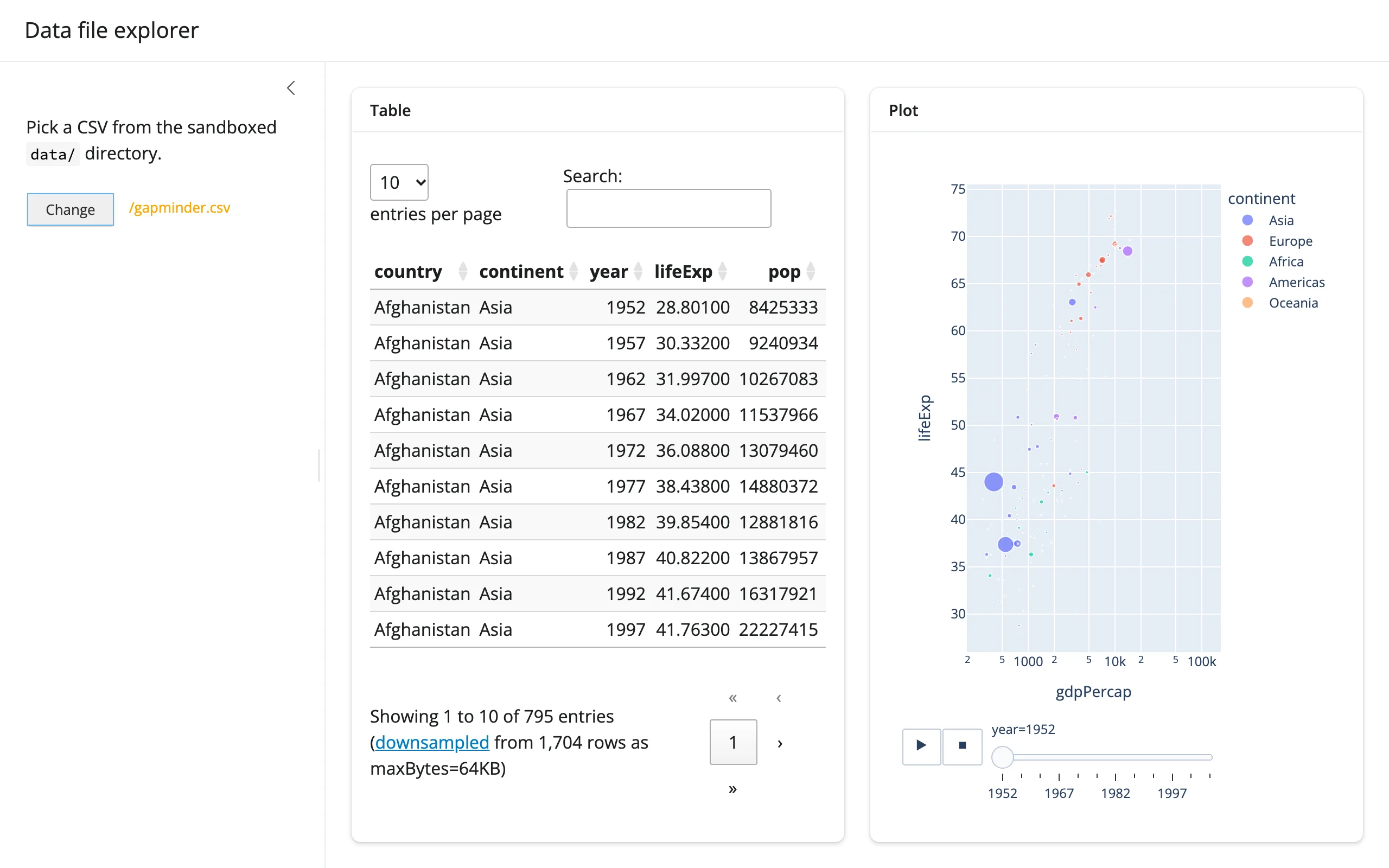
template_data_explorer.py
A small, adaptable starting point: a sandboxed chooser restricted to *.csv, feeding an itables table and a plotly figure (with an animation frame, since gapminder has a year column). Good starting point for “let users browse a data directory and explore whatever they pick.”
showcase_file_inspector.py
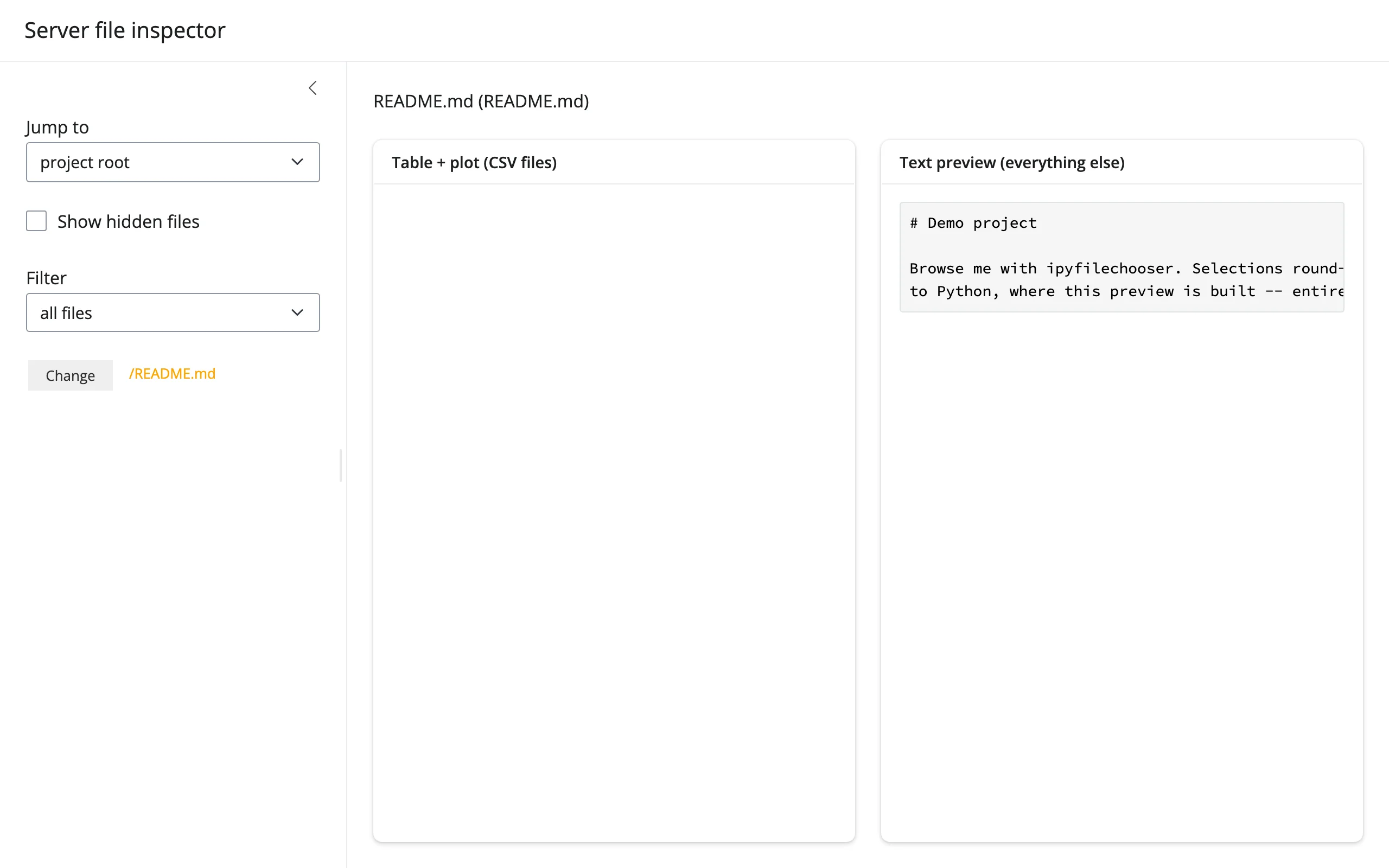
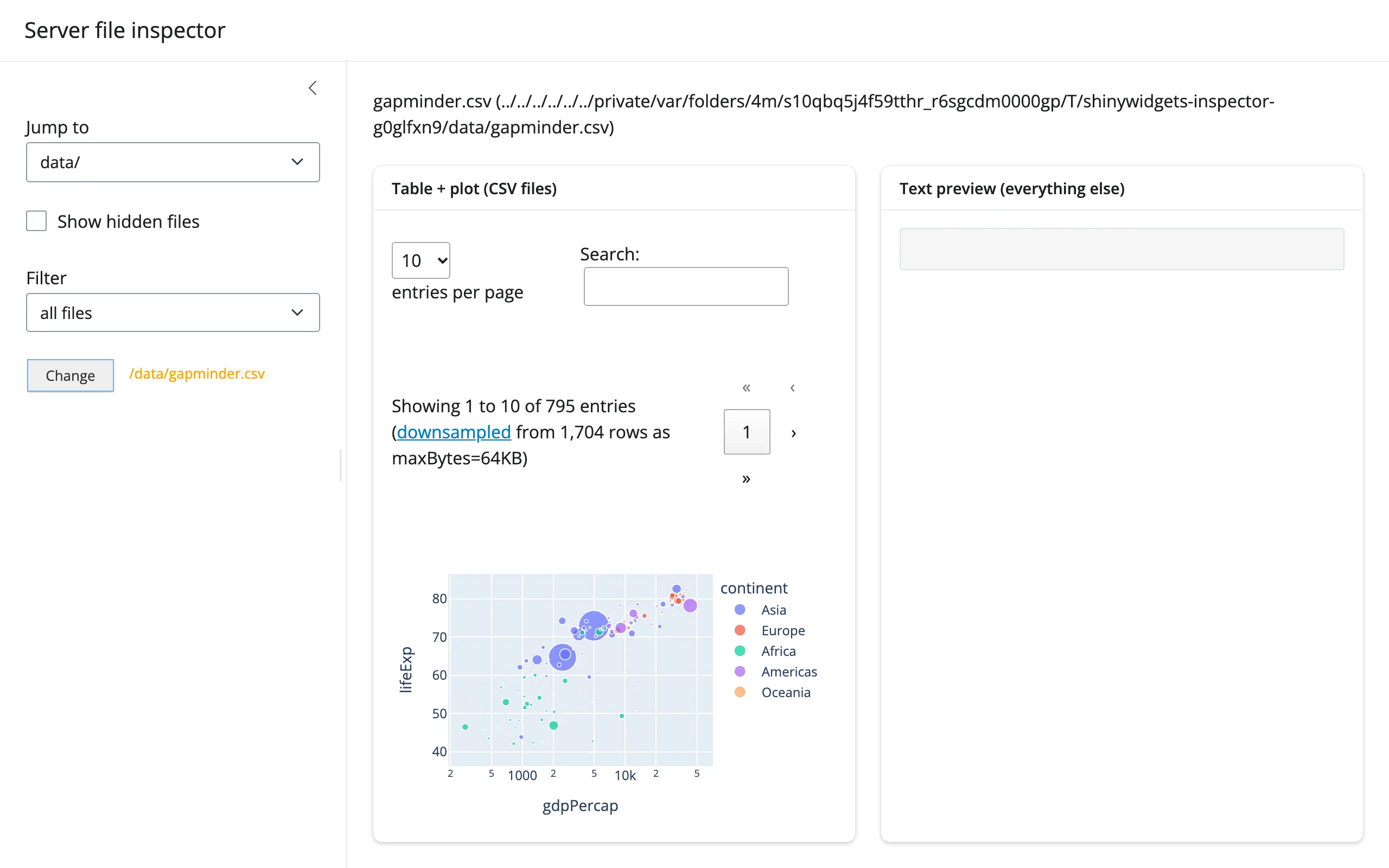
A fuller server file inspector: bookmarked “jump to” locations, a hidden-files toggle, a filter selector, and a preview that adapts to the pick – a CSV gets the table + plot treatment, anything else gets a text/code preview (with a caught exception message for anything unreadable as text). Demonstrates the select_default + reset() + @reactive.event(..., ignore_init=True) pattern from “Updating the widget from Python” end to end.
Initial state (README.md selected by default, shown as a text preview):
After jumping to data/ and picking gapminder.csv:
Learn more
- ipyfilechooser on GitHub – source, issues, and the full constructor reference (
filter_patternglob syntax,dir_icon,rows, etc.) - Related guides in this roster: itables, plotly (used here for previewing a picked CSV); render-widget for the generic
@render_widgetthis decorator specializes.