Terminal (TUI)
The positai command runs Posit Assistant as a terminal user interface (TUI). It features a rich interactive mode with image support, as well as a headless mode for scripting and automation.
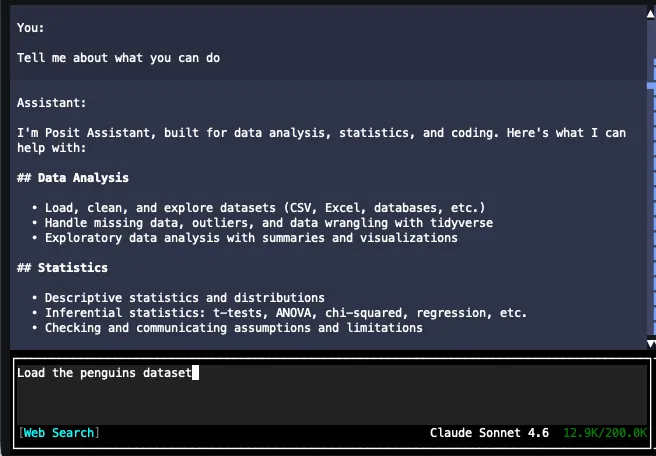
Interactive Mode
Run positai with no prompt to start an interactive session:
positaiThe interactive TUI provides a full chat experience in your terminal — markdown rendering, syntax-highlighted code blocks, tool confirmation dialogs, and inline images.
Flags
| Flag | Description |
|---|---|
-m <model> | Model to use, in provider/model-id format. |
--yolo | Skip tool confirmations (enable YOLO mode). |
-v | Enable debug logging. |
-vv | Enable trace logging. |
-h, --help | Show help. |
Examples
positai -m anthropic/claude-sonnet-4-5-20250929
positai --yolo
Images in the Terminal
When the assistant generates plots or works with images, the TUI renders them directly in your terminal. It automatically detects your terminal’s graphics capabilities and picks the best available protocol:
| Protocol | Terminals |
|---|---|
| iTerm2 | iTerm2, WezTerm, and other terminals supporting OSC 1337 |
| Kitty | Kitty and terminals supporting the Kitty graphics protocol |
| Sixel | xterm (with sixel enabled), mlterm, foot, and others |
| ANSI art | Any terminal (fallback — renders images as colored block characters) |
If none of the graphics protocols are supported, images are rendered using a lower-quality ANSI art fallback using block and symbol characters.
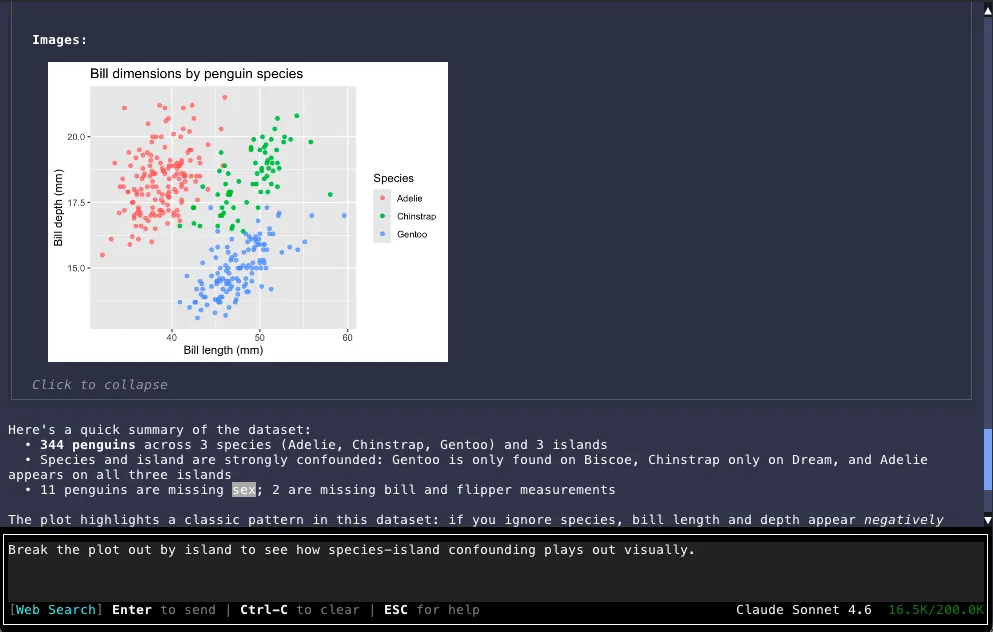
You can Click or press Space on an image while focused to expand it in a full-screen viewer. Click or press Space again to close.
If you’re running positai in the Positron or VS Code integrated terminal, enable image support
with these settings: "terminal.integrated.enableImages": true and
"terminal.integrated.gpuAcceleration": "on".
Headless Mode
Pass a prompt as an argument to run in headless mode. The assistant processes the prompt, streams the response to stdout, and exits.
positai "What is the capital of France?"Headless mode is designed for scripting and automation. The conversation ID is printed to stderr for reference.
Flags
All interactive flags are available, plus:
| Flag | Description |
|---|---|
--id <id> | Conversation ID for resuming a previous conversation. |
Examples
# Simple question
positai "Summarize the data in sales.csv"

# Use a specific model
positai -m anthropic/claude-sonnet-4-5-20250929 "Explain this error"

# Resume a conversation
positai --id abc123 "Now filter to Q4 only"

# Pipe input
echo "Fix this code" | positai
Behavior
- Tool calls are auto-approved for safe operations; dangerous commands are denied (no interactive prompt in headless mode).
- Use
--yoloto auto-approve all non-dangerous tool calls. - Exit code is
0on success,1on error. - Logs are written to
~/.positai/logs/headless.log(only when-vor-vvis specified).