Conversations
Posit Assistant keeps a full history of your conversations. You can switch between them, branch off in new directions, and export conversations in multiple formats.
Conversation History
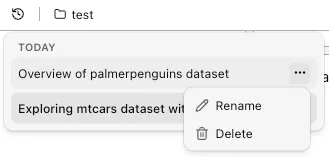
All conversations are saved automatically. Use the history panel to:
- Switch between past conversations
- Rename a conversation to give it a meaningful title (otherwise one is generated automatically)
- Delete conversations you no longer need
Branching
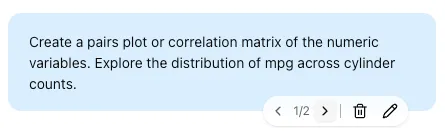
Conversations in Posit Assistant are stored as a tree, not a flat list. When you edit a previous message, the assistant creates a new branch from that point — your original conversation is preserved alongside the new direction.
This is useful when you want to:
- Try a different approach without losing your earlier work
- Ask the same question in a different way
- Explore multiple analysis directions from the same starting point
Navigate between branches using the conversation tree controls.
Import & Export
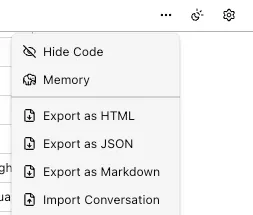
Export conversations from the three-dot menu in the chat panel. Available formats:
| Format | Description |
|---|---|
| Markdown | Plain text export of the conversation. |
| HTML | Standalone HTML file that can be viewed in any browser. |
| JSON | Full conversation tree structure for programmatic use. |
Conversations can also be imported from previously exported HTML or JSON files.
Token Usage & Compaction
Long conversations accumulate tokens, which affects response quality and speed. Posit Assistant manages this automatically:
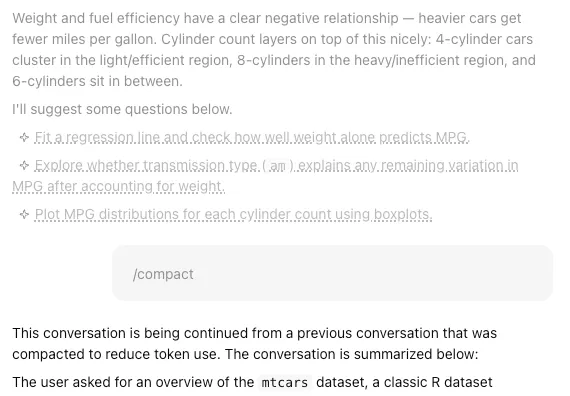
- Auto-compaction kicks in when the conversation approaches the model’s context limit. The assistant summarizes earlier messages to free up space.
- Manual compaction via
/compactlets you trigger this yourself. The summary preserves key context while hiding older messages from future requests. - Token counter — use
/contextto see current token usage.
Compacted messages are never deleted — they’re hidden from the model but preserved in the conversation tree. Previously compacted messages are shown in greyscale.