Local SAS Execution
In this variant, SAS is installed where the R or Python code runs. saspy starts SAS as a child process and talks to it over standard input and output (STDIO). No SAS server, network connection, or sign-in is involved.
For the libraries and the overall pattern, see Scenario 3: SAS in Your R and Python Code. To send SAS work to SAS Viya instead, see SAS Viya with OAuth Tokens.
What You Get
- SAS next to your code: the SAS process runs on the same host or in the same container as R or Python, under the same Linux user.
- Direct file access: SAS reads and writes the same file system as your code, including your home directory.
- The same code everywhere: a Workbench session and Connect content use the same saspy definition, as long as SAS is at the same path.
Requirements
- Linux. saspy STDIO does not work with SAS on Windows.
- SAS installed in one of these places:
- On the Workbench host, for sessions that run there
- In the session image, for Workbench with Kubernetes or Slurm
- On the Connect host, or in the content image when Connect runs content off-host
- A SAS license that is valid where SAS runs
- saspy in the Python environment, and sasquatch for R users
Set Up
Write the saspy Configuration
Create sascfg_personal.py in the saspy installation directory or in ~/.config/saspy/. A STDIO definition needs only saspath, the path to the SAS startup command:
SAS_config_names = ['local']

local = {'saspath': '/opt/sas/viya/home/SASFoundation/sas',
         'options': ['-fullstimer']}
/opt/sas/viya/home/SASFoundation/sas is the SAS path in SAS Analytics Pro and SAS Viya-based installations. A SAS 9.4 installation usually uses a path such as /opt/sasinside/SASHome/SASFoundation/9.4/bin/sas_u8.
options takes a Python list of SAS startup options. The optional autoexec key takes a string of SAS code that saspy submits after SAS starts, for example a libname statement.
R users can create the file with sasquatch and then edit it:
sasquatch::install_saspy()
sasquatch::configure_saspy()
configure_saspy() writes sascfg_personal.py to the saspy installation directory, with an empty definition named config_name. Replace it with the local definition above.
License SAS Where It Runs
SAS checks its license at startup, wherever it runs. Running SAS on Connect for viewers can need a different license from running it in Workbench sessions. Confirm with SAS that your license covers each place SAS runs.
License SAS in the installation, or pass the license file at startup.
For SAS Analytics Pro, a definition can pass the license file as a startup option:
local = {'saspath': '/opt/sas/viya/home/SASFoundation/sas',
         'options': ['-licensefile', '/opt/sas/license/license.jwt']}
Prepare Connect
- Install SAS and its license on the Connect host, or build them into the content image.
- Make sure that the Linux user that runs the content can start SAS and read the license.
- Publish the Python environment with saspy along with the content. Place
sascfg_personal.pywhere saspy finds it on Connect. Python content can include it in the bundle. R content can use~/.config/saspy/for the user that runs the content.
Use It
In R:
library(sasquatch)

sas_connect(cfgname = "local")

sas_from_r(mtcars, "cars")
sas_run_string("
proc reg data=cars;
  model mpg = wt hp;
  output out=fit predicted=pred residual=resid;
run;
")
fit <- sas_to_r("fit")

sas_disconnect()
In Python:
import saspy

sas = saspy.SASsession(cfgname="local")

cars = sas.sasdata("cars", "sashelp")
print(cars.means())
cars_df = sas.sd2df("cars", libref="sashelp")

sas.endsas()
The following screenshot shows this Python code in a Positron console in a Workbench session. saspy starts SAS as a child process, print(cars.means()) shows the PROC MEANS result, and cars_df appears in the Variables pane as a pandas data frame.
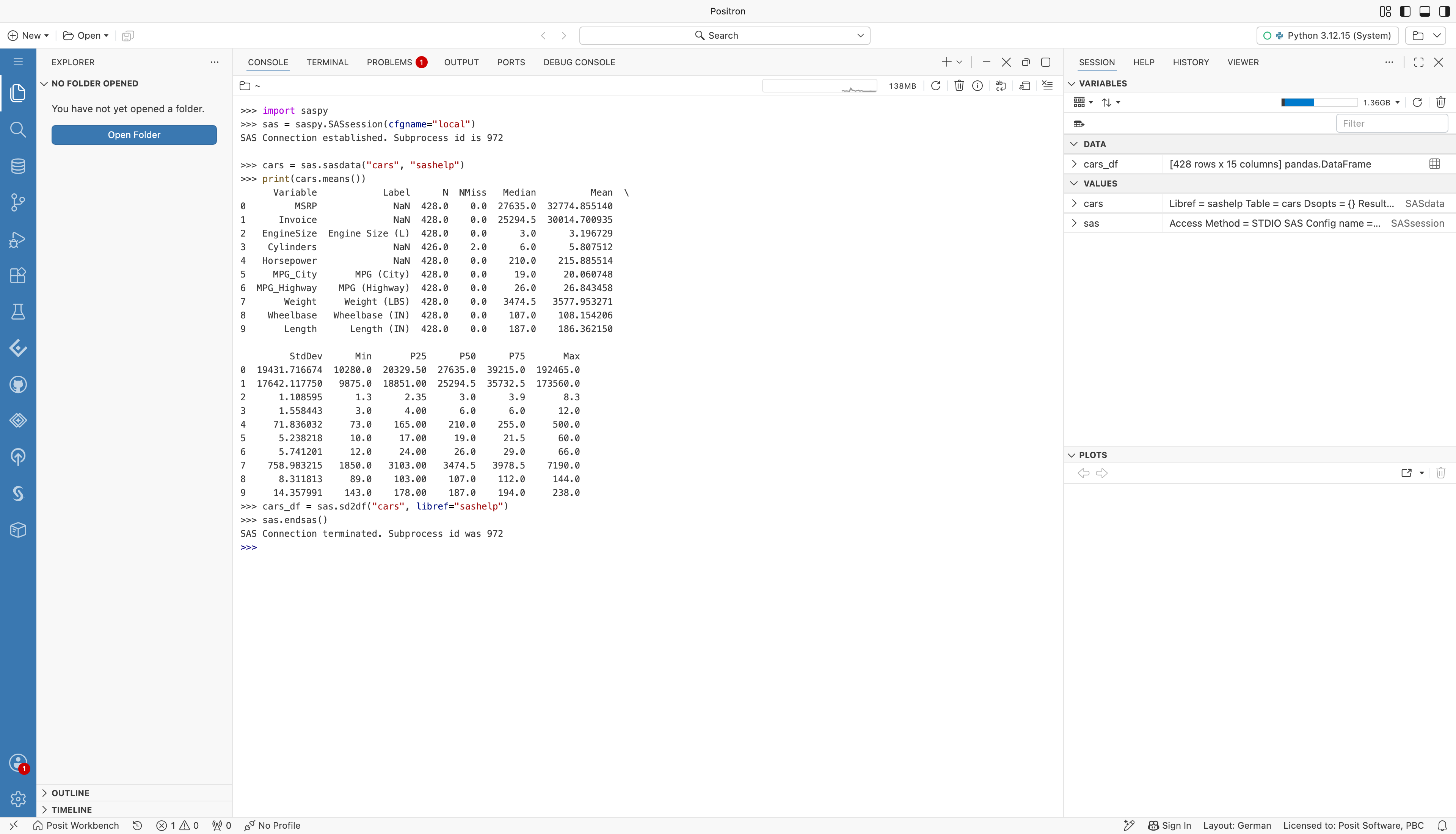
A Positron Python console running saspy with the local definition. SAS starts, the means of the sashelp.cars data set print, and the data set is copied to a pandas data frame that shows in the Variables pane.
In a Quarto document, load sasquatch and connect in a setup chunk. Later {sas} chunks run in that session:
```{r}
#| include: false
library(sasquatch)
sas_connect(cfgname = "local")
```

```{sas}
proc print data=sashelp.class(obs=5);
run;
```
Limitations
- saspy STDIO starts one SAS process for each session. Each process uses memory and processor time on the host or in the container.
- The SAS process runs as the same Linux user as the code. SAS has the same file permissions as that user, and no other identity.
- SAS work libraries are temporary. Save results to a permanent library or return them to R or Python before you disconnect.
- On Connect, a SAS process starts with the content process, not in a separate SAS server. Size the content resources for SAS.