Troubleshooting
This document contains some common issues and solutions for Posit Publisher.
Output -> Posit Publisher
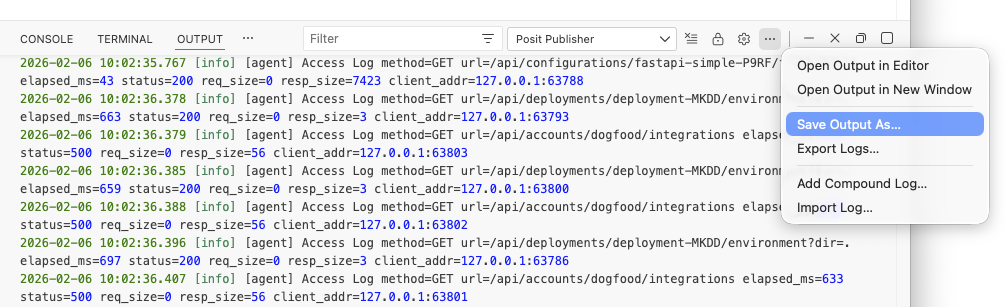
Publisher output may help to track down problems, it is located in the “Output” window under the “Posit Publisher” option.
The Output Panel in VSCode or Positron can be opened with the command palette > Output: Show Output Channels... selecting the “Posit Publisher” option.
When opening an issue it is okay to copy and paste the output as is, you can also provide this output by saving it into a file and attaching it to the issue.
The Configuration has a schema error
If deploying results in the following error:
Failed to deploy. The Configuration has a schema error
This occurs when there is a problem with the Deployment’s Configuration file. This can occur due to a missing field, an incorrect value, or even a typo.
Using an extension like Even Better TOML can help catch problems in the Configuration by providing syntax highlighting, completion, and hover text using the schema provided by Posit Publisher.
Carefully check your Configuration file for any errors, and refer to the Configuration File reference documentation for more details on the fields and values that are expected.
Deployed content does not seem to be running
The Posit Publisher attempts to access the content on the Posit Connect server after the deployment process. This error occurs when the publisher’s attempt times out or encounters an error.
The deployment logs available on Posit Connect will normally provide more insight into the details of the runtime failure that occurred.
Often times, the resolution will involve simply updating the dependencies within the requirements.txt or renv.lock file (depending on the type of content), and then redeploying. Update your dependencies and make sure your project runs successfully locally. Increasing the dependency specification by not only specifying the dependency package but also the version to be used will often overcome the issue.
Unrecognized app mode
If when deploying you see the following error:
Cannot process manifest: Unrecognized app mode
check your Configuration for the following:
type = 'unknown'
If your Configuration file contains type = 'unknown', either from the generated Configuration being unable to identify the type of your content, or if it was set to the unknown type manually, you will see this error.
The Posit Publisher extension view will show an alert when this occurs, asking for the framework you are using to be set using the type field in your Configuration.
To fix this you will need to find and set the type in your Configuration file. Supported types can be found in the Configuration File Reference documentation.
Unsupported type
If the Posit Connect server you are deploying to is older than the version that introduced support for the type set in your configuration file, you will see the “Cannot process manifest: Unrecognized app mode” error.
For example, Posit Connect 2024.12.0 introduced support for Gradio apps. Attempting to deploy a Gradio app to a server running a version of Posit Connect older than 2024.12.0 will result in this error.
renv errors on deployment
When deploying R projects, it is essential that Posit Publisher has access to a record of the dependencies used by your project to reproduce the project on Posit Connect. The renv package can create that record as a lockfile (commonly named renv.lock).
If an R project doesn’t have a lockfile on deploy, Posit Publisher prompts to provide a solution to generate the expected lockfile.
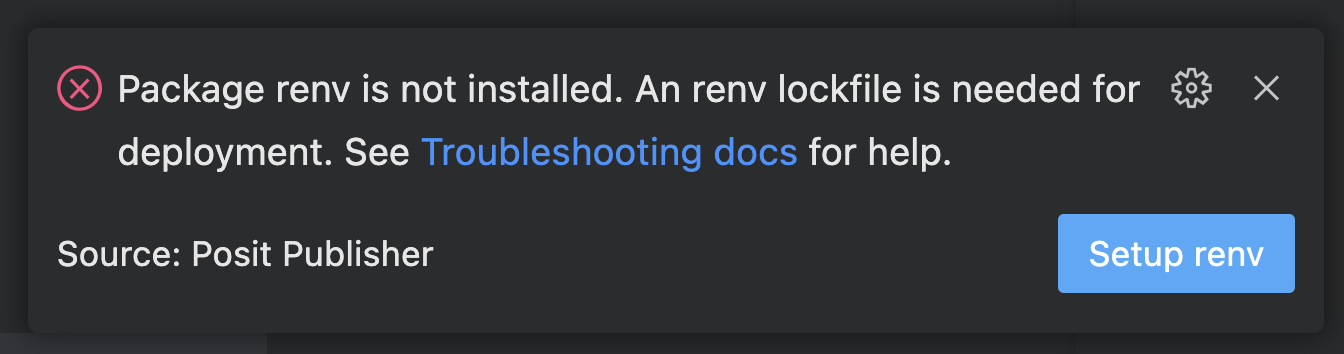
Projects that already include a lockfile do not require renv be setup.
When uncommon errors occur that Posit Publisher cannot solve for you, it prompts to evaluate the status of renv using renv::status().
Unable to reach the server / Network connectivity errors
If you see the following error when deploying or testing credentials:
Unable to reach the server. Check your network connection, VPN, and server URL.
This means the Posit Publisher could not establish a connection to the server at all. Common causes include:
- VPN not connected — If your Posit Connect server is behind a VPN, make sure you are connected to the VPN before deploying.
- DNS resolution failure — The server hostname could not be resolved. Verify the URL is correct and that your DNS settings are configured properly.
- Firewall or proxy blocking the connection — A local firewall, corporate proxy, or network policy may be preventing outbound connections to the server.
- Server is down — The Posit Connect server may be temporarily unavailable. Try accessing the server dashboard directly in your browser to confirm.
- Incorrect server URL — Double-check the URL in your credential configuration. A typo or wrong port number will prevent the connection.
EOF error on deployment
When deploying to a Posit Connect server, it is possible to encounter the error: Post "http://<Your Connect Server>/__api__/v1/content": EOF.. This occurs when a request is sent to a Connect server before it is ready to service the request.
Retrying the operation after the Posit Connect server has completed its initialization and is available for connections, should resolve the issue. Try establishing a connection directly to the Posit Connect dashboard to confirm that the server is available.
Deployment type mismatches
By default, a new deployment created within the Posit Publisher will create a new deployment on the Posit Connect server. Each deployment uses an identifier referred to as the Content GUID, which the Posit Publisher records during the first deployment along with the content type. When a deployment is redeployed, this identifier is used to update the piece of content on the Connect server rather than creating a new deployment.
The Posit Publisher provides the ability to associate a deployment with a different server deployment. It is the responsibility of the publisher to make sure that the content type of the deployment is the same as the content type of the server deployment.
Mismatches are not identified during the association operation, but instead are identifying during the next deployment operation. If mismatched, an error similar to the following will be displayed:
Content was previously deployed as 'jupyter-notebook' but your configuration is set to 'r-shiny’
Posit Connect does not allow the content type of a deployment to be changed. If you encounter this error, your best option is to create and deploy a new deployment.
Still having trouble?
If you’re still having trouble with Posit Publisher or have any questions, please reach out to us using a new GitHub discussion.
You may also want to check out the Posit Connect Cloud docs, or the FAQs and known issues.
If you think you’ve found a bug or have a feature request, please open a GitHub Issue.