import pointblank as pb

(
    pb.Validate(data=pb.load_dataset(dataset="small_table"), label="Example Validation")
    .col_vals_lt(columns="a", value=10)
    .col_vals_between(columns="d", left=0, right=5000)
    .col_vals_in_set(columns="f", set=["low", "mid", "high"])
    .col_vals_regex(columns="b", pattern=r"^[0-9]-[a-z]{3}-[0-9]{3}$")
    .interrogate()
)Quickstart
Pointblank checks that a table’s data is what you think it is. You write the rules (each one a validation step), Pointblank checks the table against them, and you get a report of what passed and what failed. The table can be a Polars or pandas DataFrame, a CSV or Parquet file, or a table in a database. This page goes through the basics in a few minutes and then points to the rest of what Pointblank can do.
Installation
Pointblank works with the DataFrame library or database you already use. The examples here use Polars, so install Pointblank with it:
pip install "pointblank[pl]"Use pointblank[pd] for pandas instead. The Installation page covers databases and the optional features.
A First Validation
A validation starts with Validate, which takes the table. Each validation method adds a step, and interrogate() runs them all against the table:
The result is a validation report, with a row for each step. The left side of the report has the rules of each step and the right side has the results:

- validation steps: each step is a separate check of one aspect of the table
- validation rules: the type of the step, the column it checks, and its key values
- validation results: how many test units were checked, passed, and failed, the threshold levels reached, and more
The second step found a value of d above 5000. The CSV button in its row downloads the failing row, so whoever reads the report can see exactly what went wrong.
Understanding Test Units
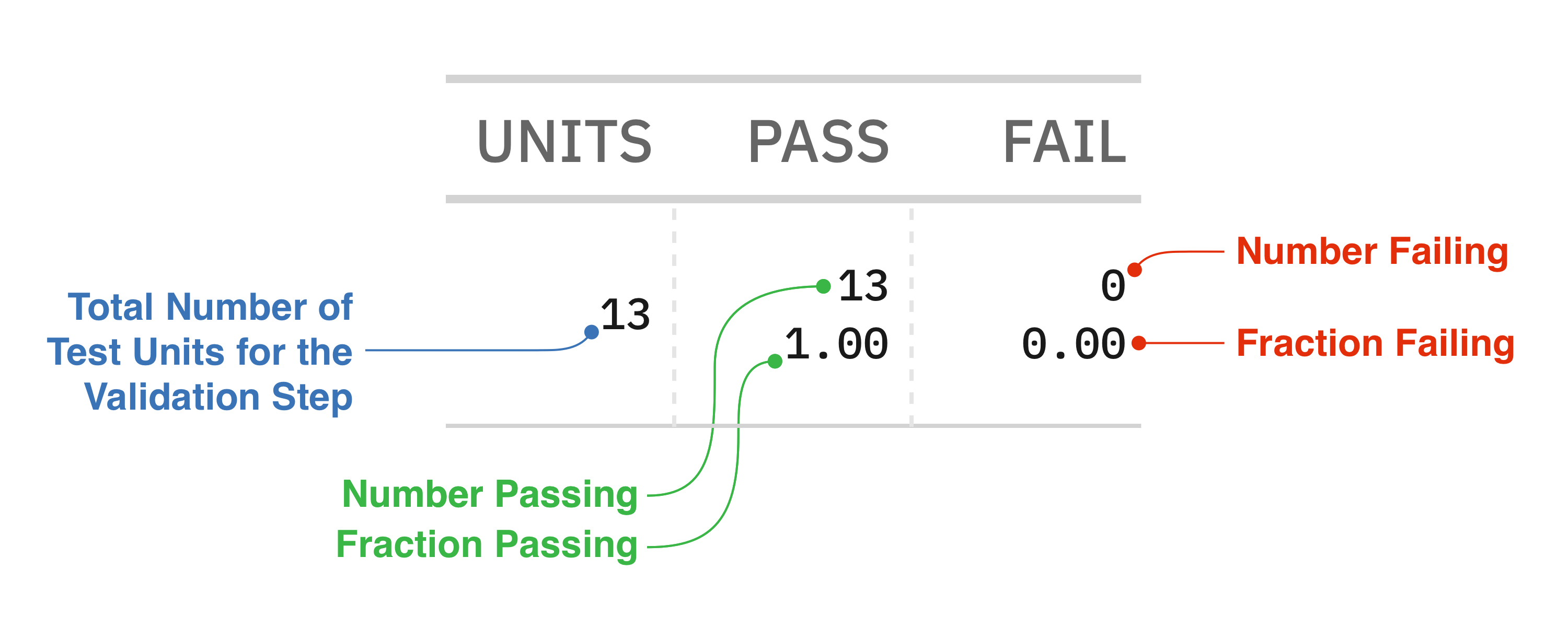
Each step counts its results in test units. A step like col_vals_lt() tests every value of a column, so each value is a test unit. A step that checks the whole table, like col_exists(), has a single test unit. The UNITS, PASS, and FAIL columns of the report show the counts, and the PASS and FAIL columns show the fractions too:
Setting Thresholds
A single failing value often isn’t a problem, but a lot of them is. Thresholds set how many failing test units are acceptable before a step is flagged at one of three levels: ‘warning’, ‘error’, and ‘critical’. Thresholds can be set for the whole validation (and changed for any step with its own thresholds=). The tuple (1, 0.1) sets the ‘warning’ level at 1 failing test unit and the ‘error’ level at 10% of them:
validation = (
    pb.Validate(
        data=pb.load_dataset(dataset="small_table"),
        label="Thresholds for the whole validation",
        thresholds=(1, 0.1),
    )
    .col_vals_lt(columns="a", value=7)
    .col_vals_between(columns="d", left=0, right=5000)
    .col_vals_not_null(columns="c")
    .interrogate()
)

validationThe W, E, and C columns show the levels. Every step reached the ‘warning’ level (a filled gray circle). Steps 1 and 3 also reached the ‘error’ level (a filled yellow circle), since more than 10% of their test units failed, while step 2 didn’t (an open circle). No ‘critical’ level was set, so that column has a dash. The Thresholds page has more ways of setting them.
Taking Action
Actions respond when a step reaches a threshold level. An action can be a message or a function (e.g., one that posts to Slack). A message can use placeholders like {step}, {type}, and {col} to say which step it’s about:
(
    pb.Validate(
        data=pb.load_dataset(dataset="small_table"),
        thresholds=(1, 0.1),
        actions=pb.Actions(error="{LEVEL}: step {step} ({type}) failed on column '{col}'."),
    )
    .col_vals_lt(columns="a", value=7)
    .col_vals_between(columns="d", left=0, right=5000)
    .col_vals_not_null(columns="c")
    .interrogate()
)
ERROR: step 1 (col_vals_lt) failed on column 'a'.
ERROR: step 3 (col_vals_not_null) failed on column 'c'.The message was printed for the two steps that reached the ‘error’ level. The Actions page covers functions as actions, and actions that run once at the end of a validation.
Using the Results
The report is for people to read, but the results are available in code too, so a script, a pipeline, or a test can act on them. all_passed() says whether every test unit passed:
validation.all_passed()FalseTo stop a pipeline or fail a test, assert_passing() and assert_below_threshold() raise an AssertionError (see Assertions). To see the failing rows of a step, use get_step_report() for a report or get_data_extracts() for a DataFrame:
validation.get_data_extracts(i=2, frame=True)
shape: (1, 9)
| _row_num_ | date_time | date | a | b | c | d | e | f |
|---|---|---|---|---|---|---|---|---|
| u32 | datetime[μs] | date | i64 | str | i64 | f64 | bool | str |
| 2 | 2016-01-04 00:32:00 | 2016-01-04 | 3 | "5-egh-163" | 8 | 9999.99 | true | "low" |
And get_sundered_data() splits the table into the rows that passed every step and the rows that didn’t (see Sundering Validated Data).
Checking Many Columns at Once
A step can check several columns, given as a list or with a column selector like pb.starts_with(). Each column gets its own step:
(
    pb.Validate(data=pb.load_dataset(dataset="small_table"))
    .col_vals_not_null(columns=pb.starts_with("d"))
    .col_vals_gt(columns=["a", "d"], value=0)
    .interrogate()
)| Pointblank Validation | |||||||||||||
2026-11-25|03:48:53 Polars |
|||||||||||||
| STEP | COLUMNS | VALUES | TBL | EVAL | UNITS | PASS | FAIL | W | E | C | EXT | ||
|---|---|---|---|---|---|---|---|---|---|---|---|---|---|
| #4CA64C | 1 |
col_vals_not_null()
|
✓ | 13 | 13 1.00 |
0 0.00 |
— | — | — | — | |||
| #4CA64C | 2 |
col_vals_not_null()
|
✓ | 13 | 13 1.00 |
0 0.00 |
— | — | — | — | |||
| #4CA64C | 3 |
col_vals_not_null()
|
✓ | 13 | 13 1.00 |
0 0.00 |
— | — | — | — | |||
| #4CA64C | 4 |
col_vals_gt()
|
✓ | 13 | 13 1.00 |
0 0.00 |
— | — | — | — | |||
| #4CA64C | 5 |
col_vals_gt()
|
✓ | 13 | 13 1.00 |
0 0.00 |
— | — | — | — | |||
The Column Selection Patterns page has the other selectors and how to combine them.
Other Kinds of Tables
Validate(data=) takes more than DataFrames. A file path, a glob of Parquet files, or a database connection string works too:
pb.Validate(data="sales.csv")
pb.Validate(data="data/orders/*.parquet")
pb.Validate(data="duckdb:///warehouse.ddb::orders")
A connection string needs the extra for its database (e.g., pointblank[duckdb], see Installation), and the table is checked in the database rather than read into memory.
What Else Pointblank Can Do
The rest of the User Guide goes further. Here’s where to look for some common tasks:
| To… | See |
|---|---|
| explore a new table before writing rules | Previewing Data, Column Summaries, Missing Values |
| have an LLM draft a validation plan from your data | Draft Validation |
| check the columns and types of a table | Schema Validation |
| check groups of rows separately, or transform the table first | Segmentation, Preprocessing |
| write rules as expressions across several columns | Expression-Based Validation |
| score data quality by dimension (completeness, validity, …) | Quality Dimensions and Scoring |
| write validations in YAML, or run them from the command line | YAML Validation Workflows, The Pointblank CLI |
| agree on what valid data looks like, and check it at both ends of a pipeline | Contracts, Pipelines |
| compare two tables, or two versions of one | Comparing Tables |
| generate realistic test data | Generating Test Data |
| check text and training data for models and LLMs | Text Checks, Scored Validation, RAG Checks |
| check dataset splits and synthetic data | Checking Splits, Checking Synthetic Data |
| measure what each validation step is worth to a model, and document the dataset | Data Ablation, Data Cards |
| build validations from metadata, or check clinical (CDISC) data | Metadata Import, CDISC Validation |
| send results to a monitoring system, or use Pointblank from an AI assistant | OpenTelemetry, MCP Server |
To keep going from here, the Overview of the Validation Plan section surveys the validation methods and the options that they share, and Validation Reports shows how to customize the report.