When you need to apply broad visual changes across an entire table, tab_options() is the right tool. Rather than styling individual cells or specific locations, this method lets you set colors, fonts, borders, and spacing for entire table parts in a single call. This page explains the structure of option names, demonstrates how to style different parts, and shows how to build a complete table theme.
A useful way to think about the relationship between tab_options() and tab_style(): use tab_options() when you want to set broad defaults for entire table parts (e.g., “all column labels should have this background color”). Use tab_style() when you need to target specific cells, columns, or rows. The two work together naturally: tab_options() sets the base theme, and tab_style() applies targeted overrides on top of it.
Great Tables exposes options to customize the appearance of tables via two methods:
- tab_style(): targeted styles (e.g. color a specific cell of data, or a specific group label).
- tab_options(): broad styles (e.g. color the header and source notes).
Both methods target parts of the table, as shown in the diagram below.
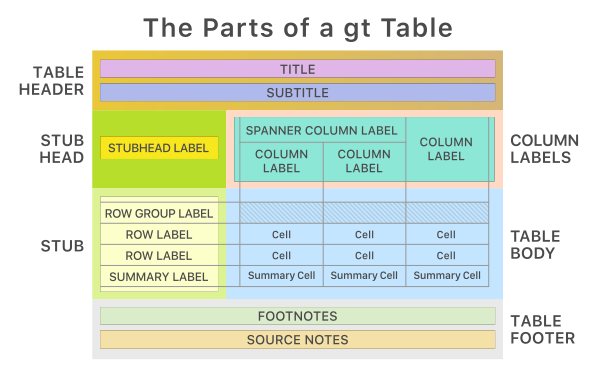
This page covers how to style and theme your table using GT.tab_options(), which is meant to quickly set a broad range of styles.
We’ll use the basic GT object below for most examples, since it marks some of the table parts.
from great_tables import GT, exibble

gt_ex = (
    GT(exibble.head(5), rowname_col="row", groupname_col="group")
    .tab_header("THE HEADING", "(a subtitle)")
    .tab_stubhead("THE STUBHEAD")
    .tab_source_note("THE SOURCE NOTE")
    .grand_summary_rows(fns={"GRAND SUMMARY ROW": lambda df: df.sum(numeric_only=True)})
)

gt_ex
| THE HEADING |
| (a subtitle) |
| THE STUBHEAD |
num |
char |
fctr |
date |
time |
datetime |
currency |
| grp_a |
| row_1 |
0.1111 |
apricot |
one |
2015-01-15 |
13:35 |
2018-01-01 02:22 |
49.95 |
| row_2 |
2.222 |
banana |
two |
2015-02-15 |
14:40 |
2018-02-02 14:33 |
17.95 |
| row_3 |
33.33 |
coconut |
three |
2015-03-15 |
15:45 |
2018-03-03 03:44 |
1.39 |
| row_4 |
444.4 |
durian |
four |
2015-04-15 |
16:50 |
2018-04-04 15:55 |
65100.0 |
| grp_b |
| row_5 |
5550.0 |
None |
five |
2015-05-15 |
17:55 |
2018-05-05 04:00 |
1325.81 |
| GRAND SUMMARY ROW |
6030.0631 |
--- |
--- |
--- |
--- |
--- |
66495.1 |
| THE SOURCE NOTE |
Table option parts
As the graph above showed, tables are made of many parts. These include the heading, column labels, and the stub. tab_options() organizes options based on table part.
The code below illustrates the table parts tab_options() can target, by setting the background color for various parts.
(
    gt_ex
    .tab_options(
        container_width = "100%",
        table_background_color="lightblue",
        heading_background_color = "gold",
        column_labels_background_color="aquamarine",
        row_group_background_color="lightyellow",
        stub_background_color="lightgreen",
        source_notes_background_color="#f1e2af",
        grand_summary_row_background_color="lightpink",
    )
)
| THE HEADING |
| (a subtitle) |
| THE STUBHEAD |
num |
char |
fctr |
date |
time |
datetime |
currency |
| grp_a |
| row_1 |
0.1111 |
apricot |
one |
2015-01-15 |
13:35 |
2018-01-01 02:22 |
49.95 |
| row_2 |
2.222 |
banana |
two |
2015-02-15 |
14:40 |
2018-02-02 14:33 |
17.95 |
| row_3 |
33.33 |
coconut |
three |
2015-03-15 |
15:45 |
2018-03-03 03:44 |
1.39 |
| row_4 |
444.4 |
durian |
four |
2015-04-15 |
16:50 |
2018-04-04 15:55 |
65100.0 |
| grp_b |
| row_5 |
5550.0 |
None |
five |
2015-05-15 |
17:55 |
2018-05-05 04:00 |
1325.81 |
| GRAND SUMMARY ROW |
6030.0631 |
--- |
--- |
--- |
--- |
--- |
66495.1 |
| THE SOURCE NOTE |
Notice two important pieces:
- The argument
heading_background_color="gold" sets the heading part’s background to gold.
- Parts like
container and table are the broadest. They cover all the other parts of the table.
Finding options: part, type, attribute
Option names in tab_options() follow a consistent naming convention. Understanding the pattern makes it easy to find the exact option you need without searching through documentation. The format is:
{part name}_{type}_{attribute}
For example, the option row_group_border_top_color has these pieces:
- part:
row_group
- type:
border_top
- attribute:
color
Here are the parts supported in tab_options():
- container, table
- heading, source_note
- column_labels, row_group, stub, stub_row
- table_body
Styling borders
Many table parts support customizing border colors and style. This is shown below for column labels.
gt_ex.tab_options(
    column_labels_border_top_color="blue",
    column_labels_border_top_style="solid",
    column_labels_border_top_width="5px"
)
| THE HEADING |
| (a subtitle) |
| THE STUBHEAD |
num |
char |
fctr |
date |
time |
datetime |
currency |
| grp_a |
| row_1 |
0.1111 |
apricot |
one |
2015-01-15 |
13:35 |
2018-01-01 02:22 |
49.95 |
| row_2 |
2.222 |
banana |
two |
2015-02-15 |
14:40 |
2018-02-02 14:33 |
17.95 |
| row_3 |
33.33 |
coconut |
three |
2015-03-15 |
15:45 |
2018-03-03 03:44 |
1.39 |
| row_4 |
444.4 |
durian |
four |
2015-04-15 |
16:50 |
2018-04-04 15:55 |
65100.0 |
| grp_b |
| row_5 |
5550.0 |
None |
five |
2015-05-15 |
17:55 |
2018-05-05 04:00 |
1325.81 |
| GRAND SUMMARY ROW |
6030.0631 |
--- |
--- |
--- |
--- |
--- |
66495.1 |
| THE SOURCE NOTE |
The column labels section now has a thick blue border on top. Each border option follows the same triplet of color, style, and width attributes, which you can combine to create the exact look you want.
Styling background color
gt_ex.tab_options(
    heading_background_color="purple"
)
| THE HEADING |
| (a subtitle) |
| THE STUBHEAD |
num |
char |
fctr |
date |
time |
datetime |
currency |
| grp_a |
| row_1 |
0.1111 |
apricot |
one |
2015-01-15 |
13:35 |
2018-01-01 02:22 |
49.95 |
| row_2 |
2.222 |
banana |
two |
2015-02-15 |
14:40 |
2018-02-02 14:33 |
17.95 |
| row_3 |
33.33 |
coconut |
three |
2015-03-15 |
15:45 |
2018-03-03 03:44 |
1.39 |
| row_4 |
444.4 |
durian |
four |
2015-04-15 |
16:50 |
2018-04-04 15:55 |
65100.0 |
| grp_b |
| row_5 |
5550.0 |
None |
five |
2015-05-15 |
17:55 |
2018-05-05 04:00 |
1325.81 |
| GRAND SUMMARY ROW |
6030.0631 |
--- |
--- |
--- |
--- |
--- |
66495.1 |
| THE SOURCE NOTE |
The heading area (title and subtitle) is now purple. Background color options are available for every table part, letting you assign a distinct visual identity to each region.
Styling body cells
The table body can style the lines between individual cells. Use the hline and vline option types to specify cell line color, style, and width.
For example, the code below changes horizontal lines (hline) between cells to be red, dashed lines.
gt_ex.tab_options(
    table_body_hlines_color="red",
    table_body_hlines_style="dashed",
    table_body_hlines_width="4px",
)
| THE HEADING |
| (a subtitle) |
| THE STUBHEAD |
num |
char |
fctr |
date |
time |
datetime |
currency |
| grp_a |
| row_1 |
0.1111 |
apricot |
one |
2015-01-15 |
13:35 |
2018-01-01 02:22 |
49.95 |
| row_2 |
2.222 |
banana |
two |
2015-02-15 |
14:40 |
2018-02-02 14:33 |
17.95 |
| row_3 |
33.33 |
coconut |
three |
2015-03-15 |
15:45 |
2018-03-03 03:44 |
1.39 |
| row_4 |
444.4 |
durian |
four |
2015-04-15 |
16:50 |
2018-04-04 15:55 |
65100.0 |
| grp_b |
| row_5 |
5550.0 |
None |
five |
2015-05-15 |
17:55 |
2018-05-05 04:00 |
1325.81 |
| GRAND SUMMARY ROW |
6030.0631 |
--- |
--- |
--- |
--- |
--- |
66495.1 |
| THE SOURCE NOTE |
In order to define the vertical lines between cells, set vline styles. For example, the code below makes both horizontal and vertical lines between cells solid.
gt_ex.tab_options(
    table_body_hlines_style="solid",
    table_body_vlines_style="solid",
)
| THE HEADING |
| (a subtitle) |
| THE STUBHEAD |
num |
char |
fctr |
date |
time |
datetime |
currency |
| grp_a |
| row_1 |
0.1111 |
apricot |
one |
2015-01-15 |
13:35 |
2018-01-01 02:22 |
49.95 |
| row_2 |
2.222 |
banana |
two |
2015-02-15 |
14:40 |
2018-02-02 14:33 |
17.95 |
| row_3 |
33.33 |
coconut |
three |
2015-03-15 |
15:45 |
2018-03-03 03:44 |
1.39 |
| row_4 |
444.4 |
durian |
four |
2015-04-15 |
16:50 |
2018-04-04 15:55 |
65100.0 |
| grp_b |
| row_5 |
5550.0 |
None |
five |
2015-05-15 |
17:55 |
2018-05-05 04:00 |
1325.81 |
| GRAND SUMMARY ROW |
6030.0631 |
--- |
--- |
--- |
--- |
--- |
66495.1 |
| THE SOURCE NOTE |
With both hlines and vlines set to solid, the table body displays a classic grid appearance. Setting either to "none" removes those lines entirely for a cleaner, minimal look.
Set options across table parts
Some options starting with table_ apply to all parts of the table. For example, fonts and background color apply everywhere.
gt_ex.tab_options(
    table_background_color="green",
    table_font_color="darkblue",
    table_font_style="italic",
    table_font_names="Times New Roman"
)
| THE HEADING |
| (a subtitle) |
| THE STUBHEAD |
num |
char |
fctr |
date |
time |
datetime |
currency |
| grp_a |
| row_1 |
0.1111 |
apricot |
one |
2015-01-15 |
13:35 |
2018-01-01 02:22 |
49.95 |
| row_2 |
2.222 |
banana |
two |
2015-02-15 |
14:40 |
2018-02-02 14:33 |
17.95 |
| row_3 |
33.33 |
coconut |
three |
2015-03-15 |
15:45 |
2018-03-03 03:44 |
1.39 |
| row_4 |
444.4 |
durian |
four |
2015-04-15 |
16:50 |
2018-04-04 15:55 |
65100.0 |
| grp_b |
| row_5 |
5550.0 |
None |
five |
2015-05-15 |
17:55 |
2018-05-05 04:00 |
1325.81 |
| GRAND SUMMARY ROW |
6030.0631 |
--- |
--- |
--- |
--- |
--- |
66495.1 |
| THE SOURCE NOTE |
Options set across the whole table, can be overridden by styling a specific part.
gt_ex.tab_options(
    table_background_color="orange",
    heading_background_color="pink"
)
| THE HEADING |
| (a subtitle) |
| THE STUBHEAD |
num |
char |
fctr |
date |
time |
datetime |
currency |
| grp_a |
| row_1 |
0.1111 |
apricot |
one |
2015-01-15 |
13:35 |
2018-01-01 02:22 |
49.95 |
| row_2 |
2.222 |
banana |
two |
2015-02-15 |
14:40 |
2018-02-02 14:33 |
17.95 |
| row_3 |
33.33 |
coconut |
three |
2015-03-15 |
15:45 |
2018-03-03 03:44 |
1.39 |
| row_4 |
444.4 |
durian |
four |
2015-04-15 |
16:50 |
2018-04-04 15:55 |
65100.0 |
| grp_b |
| row_5 |
5550.0 |
None |
five |
2015-05-15 |
17:55 |
2018-05-05 04:00 |
1325.81 |
| GRAND SUMMARY ROW |
6030.0631 |
--- |
--- |
--- |
--- |
--- |
66495.1 |
| THE SOURCE NOTE |
The orange background applies everywhere except the heading, which overrides it with pink. This layered approach means you can set sensible table-wide defaults and then customize individual parts as needed.
If you find yourself applying the same tab_options() settings across multiple tables, consider wrapping them in a function. This ensures visual consistency and lets you update the theme in one place. The next page on Premade Themes shows exactly how this works with the opt_*() convenience methods, which are essentially pre-built theme functions that are included in Great Tables.
A basic theme
Based on the sections above, we can design an overall theme for a table.
This requires setting a decent number of options, but it makes a big difference when presenting a table! Below is a table with a simple, blue theme. (The code is hidden by default, but can be expanded to see all the options set.)
Code
from great_tables import GT, exibble

# TODO: are there names we can give the three colors?
# e.g. primary = "#0076BA", etc..

(GT(exibble, rowname_col="row", groupname_col="group")
    .tab_header("THE HEADING", "(a subtitle)")
    .tab_stubhead("THE STUBHEAD")
    .tab_source_note("THE SOURCE NOTE")
    .tab_options(
        # table ----
        table_border_top_color="#004D80",
        table_border_bottom_color="#004D80",

        # heading ----
        heading_border_bottom_color="#0076BA",

        # column labels ----
        column_labels_border_top_color="#0076BA",
        column_labels_border_bottom_color="#0076BA",
        column_labels_background_color="#FFFFFF",

        # row group ----
        row_group_border_top_color="#0076BA",
        row_group_border_bottom_color="#0076BA",

        # stub ----
        stub_background_color="#0076BA",
        stub_border_style="solid",
        stub_border_color="#0076BA",

        # table body ----
        table_body_border_top_color="#0076BA",
        table_body_border_bottom_color="#0076BA",
        table_body_hlines_style="none",
        table_body_vlines_style="none",

        # misc ----
        #row_striping_background_color="#F4F4F4"
    )

)
| THE HEADING |
| (a subtitle) |
| THE STUBHEAD |
num |
char |
fctr |
date |
time |
datetime |
currency |
| grp_a |
| row_1 |
0.1111 |
apricot |
one |
2015-01-15 |
13:35 |
2018-01-01 02:22 |
49.95 |
| row_2 |
2.222 |
banana |
two |
2015-02-15 |
14:40 |
2018-02-02 14:33 |
17.95 |
| row_3 |
33.33 |
coconut |
three |
2015-03-15 |
15:45 |
2018-03-03 03:44 |
1.39 |
| row_4 |
444.4 |
durian |
four |
2015-04-15 |
16:50 |
2018-04-04 15:55 |
65100.0 |
| grp_b |
| row_5 |
5550.0 |
None |
five |
2015-05-15 |
17:55 |
2018-05-05 04:00 |
1325.81 |
| row_6 |
None |
fig |
six |
2015-06-15 |
None |
2018-06-06 16:11 |
13.255 |
| row_7 |
777000.0 |
grapefruit |
seven |
None |
19:10 |
2018-07-07 05:22 |
None |
| row_8 |
8880000.0 |
honeydew |
eight |
2015-08-15 |
20:20 |
None |
0.44 |
| THE SOURCE NOTE |
With tab_options(), you can define the visual identity of your tables at a broad level. The structured naming convention makes it straightforward to find and set the options you need, and by combining multiple options together, you can build reusable themes that give all your tables a consistent, polished appearance.